Field notes / ai-search
AI Crawler Analytics: What Server Logs Can—and Cannot—Tell You
A practical guide to separating AI crawler requests from user-facing AI Search citations, referrals, and conversions, with a defensible log-review workflow.
The short answer
AI crawler analytics is the practice of reviewing requests from automated agents associated with AI products, search engines, or other retrieval systems. A log entry can show that an automated client requested a URL under specific conditions. It cannot, by itself, show that a person saw the page, that an answer cited it, that a model used its contents, or that the request produced a conversion.
Keep these evidence layers separate:
server request → access observation → answer capture → visible citation → referral → conversionEach arrow needs its own evidence. A request is not a citation, a citation is not a visit, and a visit is not a conversion.
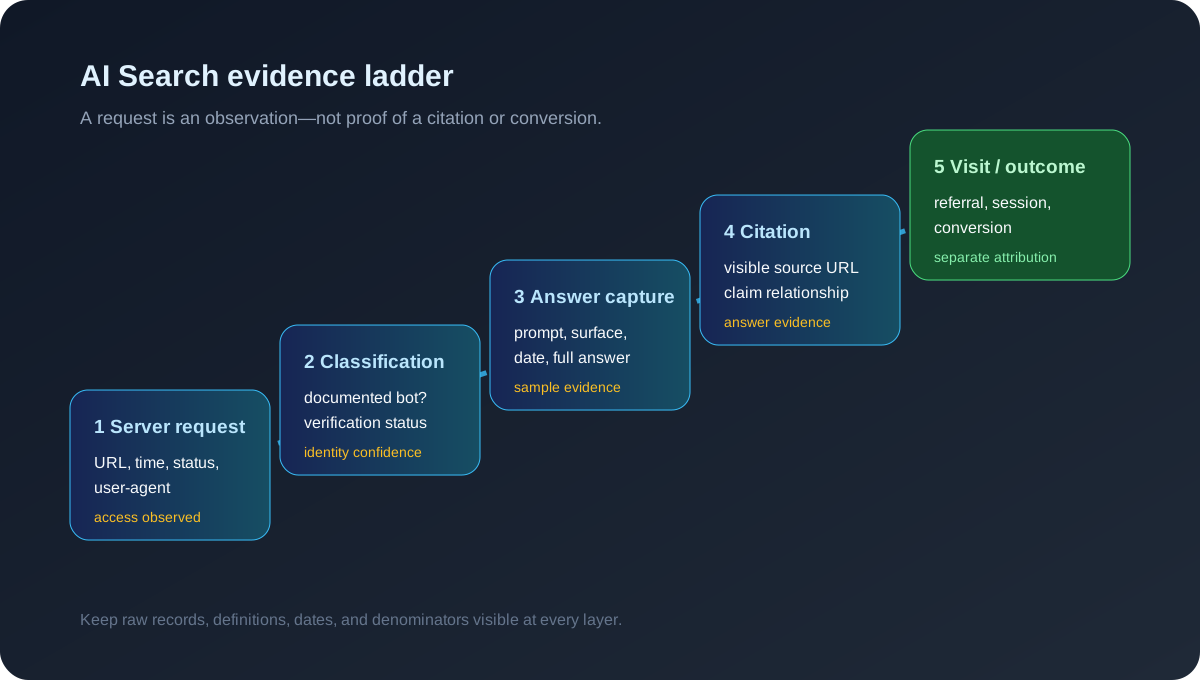
This guide addresses questions such as “Did an AI crawler visit my site?”, “Does GPTBot access prove ChatGPT cited me?”, and “How should I report AI crawler traffic?” It complements AI Search Answer Provenance, which focuses on mapping answer claims to visible sources, and AI Visibility vs AI Citations vs AI Traffic, which explains the attribution boundary.
What a server log actually records
A web access log normally records a request as observed by a server, CDN, reverse proxy, or analytics pipeline. Depending on the system, useful fields may include:
- Timestamp and timezone
- Requested URL and query string
- HTTP method and response status
- User-agent string
- Source IP or an anonymized network identifier
- Referrer, when supplied
- Response bytes and latency
- Cache, bot-management, or firewall decision
That is an access record, not a transcript of an AI system’s reasoning. It does not necessarily tell you whether the request was made for training, search retrieval, product preview, link checking, a cache refresh, a security scan, or another purpose.
The IETF Robots Exclusion Protocol, checked September 26, 2026, standardizes a way for crawlers to interpret robots.txt. It does not define a universal AI-crawler identity, prove that a compliant crawler used a page in an answer, or make a user-agent string cryptographically trustworthy.
Google’s overview of Google crawlers and fetchers, checked September 26, 2026, distinguishes crawler and fetcher categories and explains that Google publishes verification guidance. The relevant lesson for AI analytics is methodological: classify a client using documented signals and verification steps, rather than treating any matching string as proof of identity.
The five evidence layers
| Layer | What it can support | What it does not prove |
|---|---|---|
| Server request | A client requested a URL under recorded conditions | A human saw it or an answer used it |
| Crawler classification | The request resembles a documented bot, subject to verification | The request’s purpose or downstream output |
| Answer capture | A tested surface produced an answer under a declared prompt and context | That the answer represents all users or hidden retrieval |
| Visible citation | A captured answer displayed a source URL or source relationship | That the URL caused the answer or a visit |
| Referral or conversion | A measurable visit or defined business event was recorded | That a crawler request or citation caused it |
The Google Search Central guidance on AI features, checked September 26, 2026, says AI features may show links to supporting web resources and recommends foundational Search practices. It does not turn access logs into citation logs or publish a universal inclusion formula.
OpenAI’s bot documentation, checked September 26, 2026, documents separate bot identities and their stated purposes, including OAI-SearchBot for search and GPTBot for potential model training. That distinction is useful for log classification, but a request from a named bot still does not prove that a consumer answer cited the requested URL. Product behavior, account context, and user-facing surfaces are separate questions.
Why user-agent matching is not enough
A user-agent is a claim made in an HTTP request. It is a valuable first-pass field, but it is not proof of origin. A malicious client can copy a string; an intermediary can alter headers; a legitimate fetch can come from an unexpected network; and a product can change its documented agents.
Use a confidence label rather than a binary “AI bot” flag:
| Classification | Minimum basis | Reporting language |
|---|---|---|
| String match | User-agent contains a known token | “Requests matching the declared string” |
| Documented match | String matches current vendor documentation | “Requests identifying as the documented agent” |
| Verified match | Vendor-published verification method also passes | “Requests verified using the documented method” |
| Unknown | No reliable match or conflicting signals | “Unclassified automated or unknown traffic” |
Do not reverse-resolve every request and call the result verified unless the vendor documents that procedure and you apply it consistently. Preserve the original user-agent, network signal, verification result, and rule version so another reviewer can reproduce the classification.
A defensible log-review workflow
1. Define the decision
Start with one question:
- Do we need to understand automated access volume?
- Are important pages inaccessible to a documented crawler?
- Did a policy change alter bot access?
- Are visible AI citations being confused with crawler activity?
If the decision is “which pages are cited in answers?”, server logs are not the primary dataset. Build a fixed prompt panel and capture the answers separately. Tools such as PromptWatch, AI Search Console, Peec AI, and Otterly.AI may cover different combinations of prompts, answers, citations, and crawler-related data; verify the exact fields during a trial rather than assuming their metrics are interchangeable.
2. Preserve raw request evidence
Keep the raw record or an access-controlled extract before aggregation. At minimum, retain:
- Request time in UTC and the source system’s timezone
- Host, path, and response status
- User-agent and relevant headers allowed by your privacy policy
- Bot-management or cache outcome
- A stable request identifier where available
- Classification rule and rule version
Redact or minimize IP addresses and query parameters when they are not needed for the stated purpose. Log retention and personal-data handling should follow your own legal, security, and privacy requirements.
3. Normalize URLs and responses
A crawler report that counts /guide, /guide/, tracking variants, redirects, and error pages as separate content can mislead. Normalize carefully, while keeping the original URL for auditability. Break results down by:
- Canonical content group
- Status family: 2xx, 3xx, 4xx, 5xx
- HTML versus asset requests
- Cache hit versus origin fetch when exposed
- Allowed versus blocked outcome
- Response size and latency bands
A rise in requests can reflect a sitemap refresh, retry behavior, a redirect loop, an asset change, or a bot-management event. It is not automatically an increase in AI Search demand.
4. Check access against page purpose
A useful technical review asks whether the URLs that matter are accessible under the documented policy and return the intended content. Check:
robots.txtdirectives and the user-agent group that applies.- HTTP response status and redirect destination.
- Canonical and noindex signals where relevant.
- Whether important content is present in the delivered HTML.
- Authentication, rate limits, WAF challenges, and geo restrictions.
- Whether the page is stable enough to be fetched consistently.
These checks can identify access friction. They cannot establish that removing friction will produce citations or traffic.
5. Join logs only with explicitly matched datasets
To connect access observations to answer research, use a declared join key and time window. A timestamp alone is usually insufficient. A defensible record might include:
Prompt ID: CAT-04-v2
Surface: named AI Search surface
Market/language: US / English
Collection window: 2026-09-26 UTC
Answer URL: exact captured source URL, if shown
Log window: ±30 minutes, documented rule
Result: citation observed / not observed / unavailable
Even a close timestamp is not causal evidence. Multiple systems may fetch the same URL, logs may be delayed, and an answer may use a source without generating a request during your observation window. Mark the join as “associated in the sample” rather than “caused by.”
Common interpretations that fail
| Tempting statement | Safer interpretation |
|---|---|
| “GPTBot visited, so ChatGPT recommended us.” | A request identified as GPTBot was observed; recommendation evidence requires an answer capture. |
| “AI crawler volume doubled, so AI traffic doubled.” | Matching request volume changed; referral traffic requires analytics evidence. |
| “The page was crawled, so it is indexed for AI answers.” | The page was requested; indexing, retrieval, and citation remain unverified. |
| “Blocking a bot removed our citations.” | Access policy and citation observations changed around the same period; causality is not established. |
| “The crawler read our pricing page, so the model knows the price.” | A client requested the page; answer-level factual accuracy must be tested separately. |
| “No bot request means no AI system can see the page.” | No matching request was observed in this log scope and time window; other systems, caches, or datasets may exist. |
The GEO research paper by Aggarwal et al., checked September 26, 2026, provides independent experimental context for generative-engine visibility. It does not validate any particular crawler-count metric or prove that access creates production visibility.
What to report to stakeholders
A compact report should show the denominator and the boundary:
Period: 2026-09-01 to 2026-09-26 UTC
Log scope: CDN access logs for example.com
Rule version: crawler-classification-3
Matching requests: 1,240
Verified requests: 980
Unknown or unverified matches: 260
Successful HTML responses: 910
Answer captures tested: 40 prompts across declared surfaces
Visible target citations: 7 of 40 captures
Referrals attributed to AI surfaces: not separately identified
Conversions attributed to crawler access: not measurable from this dataset
The numbers above are a reporting template, not a result from an AICiteKit measurement. Replace them with your own observed counts, or leave the field unavailable. Never turn the shape of a template into a claim about a site.
Report changes with dates, rule versions, and relevant deployment events. If a firewall rule changed on September 12, compare pre- and post-change periods and say that the change is an association unless you have a controlled test.
Practical buying and trial checks
If a GEO product presents crawler or source data, ask:
- Is the metric based on server logs, direct answer captures, or both?
- Which bot identities are classified, and how are they verified?
- Does the product preserve raw request timestamps, URLs, status codes, and rule versions?
- Can I separate crawler activity from visible citations and referral traffic?
- Are failed, blocked, duplicate, and unknown requests retained?
- Does the tool disclose prompt, surface, model, market, language, and collection date for answer observations?
- Can I export the underlying records rather than only a blended score?
- What does the product mean by “AI traffic,” “AI visibility,” and “citation”?
A product that combines layers can be useful, but the definitions must remain visible. A single score that merges requests, citations, and visits is difficult to audit unless its formula and denominators are documented.
Who should use this method?
This workflow is useful for technical SEO teams, publishers, agencies, and security or analytics teams that need to explain automated access without overstating its meaning. It is especially useful when a stakeholder asks for “proof” that a crawler visit became a recommendation.
It is not a substitute for a representative study of AI users, a platform’s hidden retrieval trace, a citation-monitoring dataset, or conversion attribution. Small sites may begin with a sampled log export and a manually reviewed prompt panel before buying a broader monitoring platform.
FAQ
Does an AI crawler request prove a citation?
No. It proves only that a matching client requested a URL in the observed log scope. A citation requires an answer capture showing the URL or source relationship.
Does robots.txt control every AI use of a page?
Do not assume that. The RFC defines a protocol for crawlers that choose to follow it; it does not create universal enforcement or cover every way content may be accessed. Check each vendor’s published policy and your own technical controls.
Should I block every AI crawler?
There is no universal answer. Decide based on the documented purpose, your content and licensing position, legal advice, operational risk, and whether access is needed for a defined product or search workflow. Measure the policy change; do not promise a visibility outcome.
Can server logs measure AI referrals?
They can contribute to referral analysis when a user-facing request includes a reliable referrer or when analytics identifies a source. Crawler requests without a user session are not user referrals, and missing referrers do not prove that no referral occurred.
What is the most useful first step?
Separate your datasets: classify access requests with a versioned rule, then run a small fixed prompt panel for answer and citation evidence. Compare the questions you actually need to answer, not a blended count.
Evidence snapshot
| Source | Public signal | What it supports | Confidence |
|---|---|---|---|
| Google crawler and fetcher overview | Official crawler categories and verification guidance | Why bot identity should be checked using documented signals | High for Google’s documented systems |
| OpenAI bot documentation | Official descriptions of OpenAI bot identities and purposes | Product-specific bot classification context | High for the documentation; not a citation guarantee |
| Google Search Central: AI features | Official guidance on AI-feature links and Search practices | Boundary between supporting links and access-log evidence | High for the guidance |
| IETF RFC 9309 | Independent standards-track specification for Robots Exclusion Protocol | What robots.txt standardizes and what it does not prove | High for the protocol; not vendor enforcement |
| Aggarwal et al., GEO | Independent academic research on generative-engine visibility | Research context for visibility experiments | Medium; not validation of crawler metrics |
| AICiteKit editorial framework | Layered log, answer, citation, referral, and conversion workflow | Conditional interpretation and trial questions | Editorial |
Sources and verification
- Google crawler and fetcher overview — official crawler categories and verification guidance; checked September 26, 2026.
- OpenAI bot documentation — official descriptions of OpenAI bot identities and purposes; checked September 26, 2026.
- Google Search Central: AI features and your website — official guidance on AI-feature links and foundational Search practices; checked September 26, 2026.
- IETF RFC 9309 — Robots Exclusion Protocol specification; checked September 26, 2026.
- Aggarwal et al., GEO: Generative Engine Optimization — independent academic research context; checked September 26, 2026.
- AICiteKit: AI Search Answer Provenance — related claim-to-source workflow.
- AICiteKit: AI Visibility vs AI Citations vs AI Traffic — related attribution boundary.
Last reviewed: September 26, 2026
This is AICiteKit editorial guidance. It does not guarantee crawling, indexing, citations, rankings, traffic, or revenue.