Field notes / ai-search
AI Search Evidence Capture: How to Save Answers, Citations, and Conditions
A practical AI Search evidence-capture workflow for preserving prompts, answers, visible citations, source URLs, and collection conditions without overstating what one observation proves.
The short answer
AI Search evidence capture is the practice of preserving enough context around an AI answer that another person can inspect what was asked, what was returned, which sources were visible, and which conditions were known at collection time.
Use this sequence:
freeze the observation → capture the answer → save visible sources → record conditions → split claims → bound the conclusionA screenshot can be useful, but it is rarely a complete research record. It may omit the exact prompt, surface, model label, market, timestamp, hidden continuation, source URL, or failed state. Capture the smallest complete record your team needs to rerun and challenge the observation.
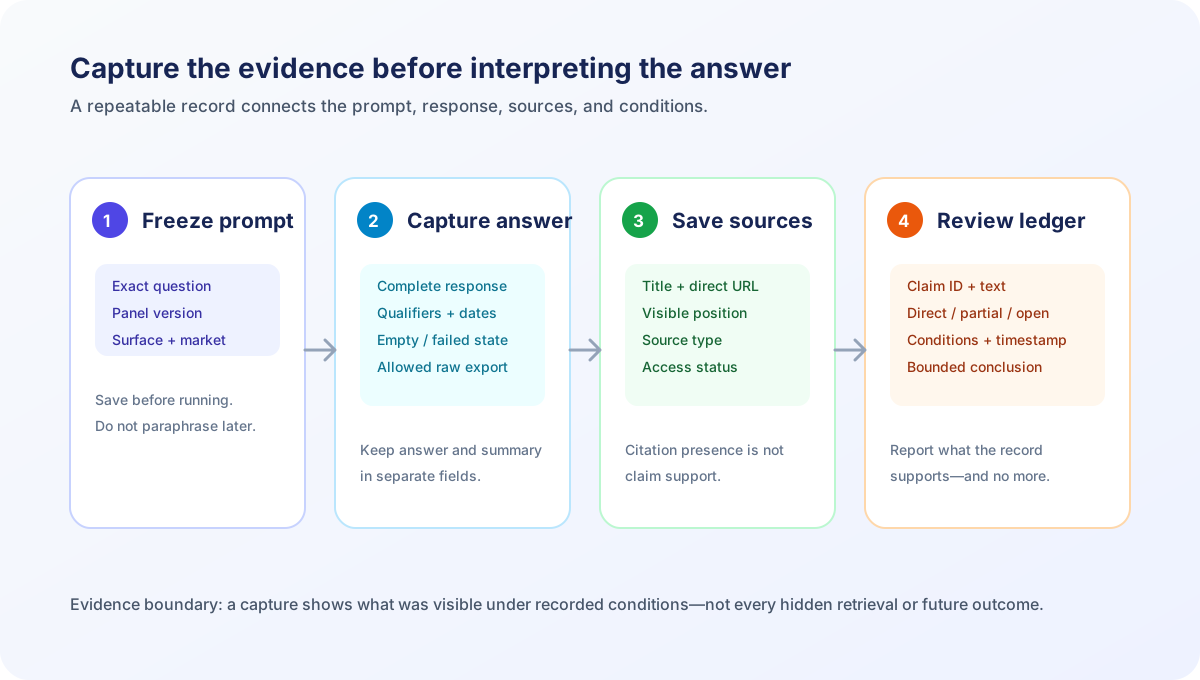
This guide addresses searches such as “how do I save ChatGPT citations?”, “how should I record AI Search results?”, and “what evidence do I need for a GEO audit?” It is a research and quality-assurance workflow, not a promise of rankings, citations, traffic, or revenue.
Why screenshots are not enough
A screenshot preserves a visual moment. It does not necessarily preserve the observation that produced it.
| Missing field | Why it changes the interpretation |
|---|---|
| Exact prompt text | A paraphrase can change the intent, constraints, and answer |
| Surface and mode | A search feature, chat interface, and API tool expose different evidence |
| Model label | Different models or modes may retrieve and present different sources |
| Market and language | Local availability, currency, and source selection can vary |
| Timestamp and time zone | Prices, features, indexes, and answers can change |
| Complete answer | A cropped answer may hide qualifiers or a later source list |
| Direct URLs | A source title alone may be ambiguous or difficult to verify |
| Empty or failed state | Omitting failures can inflate an apparent observation rate |
Google’s documentation for AI features and your website, checked November 2, 2026, says that AI features may show links to supporting web resources and recommends foundational Search practices. It does not provide a universal evidence-capture schema or guarantee that a page will appear.
OpenAI’s web search documentation, checked November 2, 2026, documents web-search citations and source fields for that API tool. That supports recording the fields exposed by a particular API call; it does not establish that every ChatGPT surface, model, or other answer engine exposes the same fields.
The research paper GEO: Generative Engine Optimization, checked November 2, 2026, is useful context for studying generative-engine visibility in a defined experimental setting. It does not validate a current vendor score, platform-wide citation rate, or business outcome.
The evidence boundary is simple: capture proves what was visible in the captured observation. It does not reveal every retrieval candidate, hidden ranking rule, user context, or causal mechanism.
What a complete observation record contains
Start with an observation ID and save one record per answer. A practical minimum is:
| Field | Example | Required interpretation |
|---|---|---|
| Observation ID | pricing-us-0042 | Stable identifier for review and reruns |
| Prompt set version | buyer-panel-v3 | Shows whether the question changed |
| Exact prompt | Saved verbatim | Prevents paraphrase drift |
| Surface and mode | Declared interface or API tool | Defines the observation scope |
| Model label | Displayed label or not exposed | Do not infer an undisclosed model |
| Market and language | US / en-US | Controls regional and language context |
| Collected at | ISO timestamp with time zone | Makes timing inspectable |
| Answer capture | Allowed near-raw text or export | Preserves qualifiers and wording |
| Visible sources | Title and direct URL pairs | Enables claim-to-source review |
| Status | Complete, empty, failed, gated, or partial | Prevents silent omission |
| Collector and method | Human, API, or approved automation | Documents how evidence was obtained |
Do not silently fill unknown fields. Use not exposed, not recorded, or unavailable. An explicit unknown is more useful than a guessed model, retrieval query, location, or reason for source selection.
Step 1: Freeze the question before collecting
Evidence capture is not reliable when the prompt is edited after the answer looks interesting. Create a versioned panel first.
Useful prompt cohorts include:
- Branded: what the company or product does
- Category: which options fit a stated need
- Comparison: how named alternatives differ
- Product fact: pricing, limits, integrations, and availability
- Problem-led: which approaches fit a job to be done
- Regional: questions where location, currency, or service area matters
Record the exact punctuation, constraints, product names, date assumptions, and attached context. If the surface adds system context or search settings that are not exposed, record that limitation rather than inventing a value.
The AI Search prompt sampling guide explains why query count alone is a weak measurement design. The AI Search answer reproducibility guide covers how to rerun a frozen panel without claiming that identical wording is required.
Step 2: Capture the full answer before summarising it
Save the answer before extracting metrics or writing a conclusion. Where platform terms, privacy rules, and internal policies allow it, preserve:
- The exact prompt and panel version.
- The complete answer or an approved near-raw export.
- The visible citation markers and source list.
- Every direct source URL available from the interface.
- Mentioned brands, products, recommendations, and negative statements.
- Prices, limits, dates, locations, and other material qualifiers.
- Empty, no-source, error, login-gated, and truncated states.
- Collection conditions and timestamp.
If raw retention is not allowed, save a structured transcription and document the redaction rule. A summary written from memory is not equivalent to a captured answer.
Capture answer text and sources separately
Keep answer content and source evidence in separate fields. This makes it possible to say that a brand was mentioned without claiming that its own URL was cited.
| Field | Example value | What it supports |
|---|---|---|
| Answer text | “Tool A may fit a small agency…” | What the answer said |
| Brand status | Mentioned, recommended, criticized, absent | A defined text observation |
| Owned URL visible | Yes / no / unclear | Visible source presence |
| Source URL | Direct URL as shown | URL-level inspection |
| Source title | Title as displayed | Human-readable source identity |
| Source position | Listed first, second, or not exposed | Ordering in the captured source set |
| Claim support | Direct, partial, unrelated, unresolved | Claim-to-source review |
A visible URL does not prove a click. A brand mention does not prove a recommendation. A recommendation does not prove that the source supports every product fact in the answer.
The AI Search evidence ledger and AI Search citation QA workflow provide related methods for keeping those fields distinct.
Step 3: Record the collection conditions
The same prompt can produce different observations when the context changes. Add a conditions block to every capture:
observation_id: pricing-us-0042
prompt_set_version: buyer-panel-v3
surface_and_mode: declared interface
model_label: displayed label or not exposed
market_and_language: US / en-US
account_state: signed-in, anonymous, or not recorded
device_context: desktop, mobile, API, or not recorded
collected_at: 2026-11-02T14:30:00-05:00
answer_status: complete / partial / failed / gated
source_field: visible links / API citations / no source field
page_or_product_version: if exposed
Do not treat an API capture as interchangeable with a consumer interface capture. They may expose different source fields, context, controls, and answer presentation. Likewise, do not compare a US-English answer with a German answer as if the source set were expected to match.
If the interface does not expose a field, write not exposed. If your collector did not record a field, write not recorded. Those are different limitations.
Step 4: Preserve negative and incomplete observations
A research set becomes misleading when only successful answers are retained. Save these states explicitly:
- No answer returned
- Answer returned without visible sources
- Source list failed to load
- Login, paywall, or consent gate blocked collection
- Tool timeout or API error
- Answer was truncated
- Prompt was rejected or changed by the interface
- A source URL was displayed but could not be opened
Use a status taxonomy that your team agrees on before analysis:
| Status | Meaning | Count in the denominator? |
|---|---|---|
complete | Answer and intended evidence fields captured | Yes, if the panel defines it |
partial | Some answer or source evidence missing | Yes, but report separately |
no-source | Answer captured; no source field visible | Yes for answer analysis, not source-rate analysis |
gated | Access or permission prevented capture | Report as an access outcome |
failed | Collection failed before a usable answer | Report separately from no citation |
excluded | Removed under a predeclared rule | Preserve the reason |
Do not label every failed collection a “no citation.” A failed request and a completed answer with no visible source are different observations.
Step 5: Split the answer into claims
After preservation, break the answer into material claims. This is where evidence capture becomes an audit rather than an archive.
| Claim ID | Answer claim | Claim class | Source shown? | Support status |
|---|---|---|---|---|
fact-01 | A plan includes a stated feature | Product fact | Yes / no | Direct, partial, or unresolved |
price-02 | A plan costs a stated amount | Commercial fact | Yes / no | First-party check required |
fit-03 | A tool suits the stated use case | Recommendation | Yes / no | Criteria must be disclosed |
region-04 | A service covers a stated market | Availability | Yes / no | Region and date check required |
compare-05 | One option is better than another | Comparative judgment | Yes / no | Opinion unless method is shown |
Then compare the claim with the source at the same scope. Check entity, plan, geography, currency, date, version, and qualifiers. A source can be relevant to the topic while failing to support the exact sentence.
The AI Search claim coverage audit explains how to classify direct, partial, contradicted, and unavailable support. The AI Search source freshness audit covers the separate question of whether a source is current enough for a dynamic claim.
Step 6: Hash or version the record without pretending it is immutable truth
Teams often want a checksum or record hash so that later edits are detectable. That is useful for integrity, but it does not make the answer true or prove that the capture was complete.
If you use a hash, document:
- Which fields were included
- Whether whitespace and line endings were normalised
- Whether URLs were canonicalised
- How redactions were represented
- When the hash was generated
- Where the original permitted evidence is retained
A hash can show that a stored record changed. It cannot show why the answer was generated, whether a hidden interface state differed, or whether the source supported the claim. Treat integrity metadata and evidence interpretation as separate layers.
For day-to-day work, a versioned JSON or CSV export plus a human-readable review note is often more useful than a hash alone. The record should remain inspectable by the people who need to challenge the conclusion.
Step 7: Turn captures into a bounded comparison
Only compare records that share the conditions required by the question. A release check may require the same prompt, surface, market, language, and declared collection method. A market study may intentionally vary geography, but then geography is part of the design.
Compare at three levels:
- Answer structure: Did the answer type, recommendation, or qualifiers change?
- Claim set: Which material claims were added, removed, or altered?
- Source set: Which visible URLs changed, and do they support the changed claims?
| Observation | Safe statement | Unsupported leap |
|---|---|---|
| Owned URL visible once | The URL appeared in this capture | The site now ranks universally |
| Competitor URL visible more often in a panel | The competitor URL was more frequent in that panel | The model prefers the competitor in all contexts |
| Answer changed after a page release | The answer differed after the release | The release caused the difference |
| Source supports one claim | The source supports that claim at the recorded scope | The source validates the entire answer |
| Several captures repeat a result | Repetition occurred under the declared conditions | Permanent eligibility or guaranteed visibility |
The AI Search regression testing guide provides a release-oriented comparison structure. The AI Search citation-to-visit guide explains why a visible citation and a subsequent visit should remain separate measurements.
Tool-assisted capture: what to verify
Tools such as AI Search Console, Otterly.AI, Peec AI, Profound, PromptWatch, and Rankscale may support different combinations of prompt monitoring, answer capture, citation tracking, exports, and history. Their metrics and retention models are not automatically interchangeable.
During a trial or implementation review, verify:
- Whether the exact prompt is retained or only a prompt label
- Whether the complete answer is available after a refresh
- Whether source titles and direct URLs are exportable
- Whether model, surface, market, language, and timestamp are exposed
- How failures, retries, empty answers, and gated states are represented
- Whether changed prompts create a new version or overwrite history
- Whether the product deduplicates, normalises, or groups source URLs
- Whether exports preserve raw evidence or only derived scores
- How refresh intervals, credits, retention, and plan limits affect the sample
A dashboard can make collection easier without making the underlying answer deterministic. Ask to inspect a real export before treating a score as an auditable observation.
A compact evidence-capture template
Use this as a starting point, then adapt it to your retention and privacy requirements:
observation_id:
prompt_set_version:
prompt:
surface_and_mode:
model_label:
market_and_language:
account_or_personalisation_state:
device_or_api_context:
collected_at:
collector_and_method:
answer_status:
answer_capture_reference:
visible_sources:
mentioned_entities:
recommendations:
material_claims:
source_support_status:
redactions_or_limitations:
next_action:
reviewed_by:
reviewed_at:
For a source row, retain:
source_title:
source_url:
source_type: official / independent / community / directory / unknown
visible_position:
claim_ids_supported:
scope_checked:
date_checked:
access_status:
notes:
The template is not a universal standard. Its purpose is to make missing information visible before a result is presented as a finding.
What this workflow can and cannot establish
It can establish
- What a defined prompt returned in a recorded observation
- Which visible sources and URLs were available in that capture
- Whether a material claim was directly, partially, or not supported by the checked source
- Whether two declared captures differ in wording, claims, recommendations, or source sets
- Which fields were unavailable, failed, gated, or not recorded
It cannot establish by itself
- A universal ranking across all users or prompts
- A hidden retrieval or source-selection rule
- That a page change caused an answer change
- That a citation generated a click, lead, or sale
- That a vendor’s visibility score is comparable with another vendor’s score
- That one captured answer represents an entire model, platform, or market
Keep mention, recommendation, visible citation, source support, referral, and conversion as separate evidence layers. The AI Search measurement baseline guide shows how to define those layers before collecting a time series.
FAQ
Is a screenshot enough for a GEO report?
Usually not. It can preserve visual context, but a defensible report also needs the exact prompt, surface, timestamp, market or language assumptions, answer status, and direct source URLs where available. If those fields cannot be recovered, label the screenshot as limited evidence.
Should I save the full AI answer?
Where platform terms, privacy requirements, and internal policy allow it, save the full answer or an approved near-raw capture before summarising it. If you must redact or summarise, record the rule and the fields that were lost. Do not imply that a summary is a complete transcript.
What if the interface does not show a model or source URL?
Record not exposed and continue with the fields that are available. Do not infer a hidden model, retrieval query, or canonical URL from a title alone. The missing field is part of the evidence boundary.
How many AI answers should I capture?
The answer depends on the decision, prompt cohort, surface, and acceptable uncertainty. Define the panel and stopping rule before collection. Repeating one prompt cannot estimate all users, and a larger unstructured sample does not automatically become representative.
Does saving citations prove that my page is visible in AI Search?
It proves that a URL was visible in the captured answer under the recorded conditions. It does not prove universal visibility, a ranking position, a click, or a business outcome.
Can a GEO tool replace an evidence log?
A tool may automate collection and history, but buyers should verify what is retained, exported, and counted. If a product exposes only a score without the underlying prompt, answer, source set, and conditions, the score may be useful operationally while remaining difficult to audit independently.
AICiteKit editorial conclusion
Capture the observation before interpreting it. Preserve the prompt, answer, visible sources, conditions, failures, and claim-level review status. Then make the narrowest statement the record supports.
For a first implementation, create a small versioned panel, save complete and failed states, inspect direct URLs, and manually review a sample of claim-to-source relationships. Add automation only after the evidence contract is clear. The strongest workflow is not the one with the most screenshots or the largest score; it is the one another reviewer can understand, rerun, and challenge.
Sources and verification
- Google Search Central: AI features and your website — official guidance on AI features and supporting web resources; checked November 2, 2026.
- OpenAI: Web search tool documentation — official documentation for citations and source fields exposed by the API tool; checked November 2, 2026.
- GEO: Generative Engine Optimization — independent research context for a defined generative-engine experiment; checked November 2, 2026.
- AICiteKit editorial interpretation — the evidence boundaries, templates, and workflow recommendations are editorial guidance, not platform guarantees.
Last reviewed: November 2, 2026. Data confidence: High for the cited official documentation and research paper links; medium for platform behavior outside the documented fields; editorial recommendations are conditional and should be tested against the chosen surface.